Friday, October 08, 2010
Spam, Spam, Spam, Eggs and Spam


Wednesday, April 28, 2010
Sunday, April 11, 2010
Remove Played Podcasts
Quite unfortunately, Apple removed a very useful feature in iTunes 9.1. Previously, it was possible to go to the Podcasts pane and bulk-select the entire podcast list, and in the context-menu, select “Allow Auto Delete”.
This was an important feature, as otherwise, podcasts with set to “Do Not Auto Delete” would stick around after refreshing my podcast feeds. Of course, I had already set in the iTunes preferences that I only wanted to keep unplayed podcasts, but iTunes had this extra un-Apple-like complication of overriding that setting on a per-file basis.
Anyways, as a stop-gap measure, I wrote an Automator service to delete played podcasts.
The service is stored at http://sites.google.com/site/smithco/Home/remove-played-podcasts/RemovePlayedPodcasts.zip?attredirects=0&d=1 and can be installed by unzipping it and copying it to your Services folder (<user>/Library/Services).
The service is built for Snow Leopard (OS X 10.6).
This service contains AppleScript code from Rob Ryan (http://discussions.info.apple.com/message.jspa?messageID=11316250#11316250).
Friday, March 26, 2010
Colour Fun
I had fun playing withe colours in this set of family vacation photos. I did figure out two good lessons by experimentation.
Firstly, it can be useful to compress the colour range to create an apparent depth. I really managed to make the colours in the kite pop out by slicing off the top and bottom of the colour range.
http://www.flickr.com/photos/smithco/4464331426/
Secondly, black & white can be made more interesting by pushing the hues slightly to one colour. Here, I pushed the colour slightly towards blue.
http://www.flickr.com/photos/smithco/4464341186/
Thirdly, the “rule of thirds” was something I read somewhere, though I don’t recall exactly where. A bit of tinkering gave me some nice composition results. What was a cute, but bland photo of Harrison was made much better by cropping
it such that he was centred on the intersection of the lower and right third dividers.
http://www.flickr.com/photos/smithco/4463551035
The full set of photos is at http://www.flickr.com/photos/smithco/sets/72157623581272873/
Saturday, March 06, 2010
Dragons in 20 Days!
While waiting, let's watch the trailer over and over again.
Of technical interest, the dragons were creating using the new character rigging technology DreamWorks has been developing for the last few years. The dragons were largely completed by the time I started at DreamWorks, but I did get to help fix a few bugs on them.
Wednesday, November 18, 2009
"Merry Madagascar" credit

Wow, after thirteen months in the movie industry, I finally have a real credit.
Saturday, September 12, 2009

Tuesday, July 07, 2009
Hans Zimmer at DreamWorks
Sunday, May 17, 2009

Wednesday, January 14, 2009
A Night at the Jim Henson Company
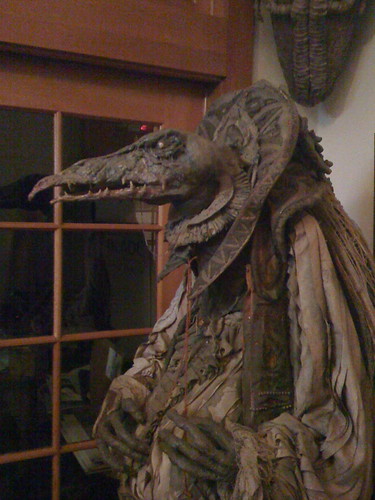
The evening was fantastically cool. The Jim Henson Company currently resides in Charlie Chaplin's studios. There is a lot of history at this location. And, all around the studio, especially in the reception, are amazing items from Henson productions. Unfortunately, I only had my iPhone, and could only take photos of the reception and exterior. The few decent photos I did get are on my Flickr page.
The demonstration consisted of a few talks on the history of digital puppetry and then the live demonstration. A great surprise is that Brian Henson gave an unscheduled appearance to talk about his father's perspective on CGI. The live demo worked far better than I expected. Two puppeteers man a character, one for the voice and face controls and one in a motion capture suit. The performance in captured and rendered in to a CGI scene in real time. Thus, digital characters can interact with a live performance.
Afterwards, we got a short tour of the Creature Shop, where they make the puppets. They had both new and old puppets out on display and we got a short performance demonstration of a traditional rod puppet by Grant Baciocco. Among the puppets were some of the realistic animal animatronics, those used for Puppet Up! and some of the older puppets used in Dinosaurs and The Storyteller. It is a bit surreal to see the puppets from shows I grew up with.
It certainly was a night to remember!